In order to create a new player account please follow these intsructions:
1. Tap the Sign In button in the top right corner of the mobile app
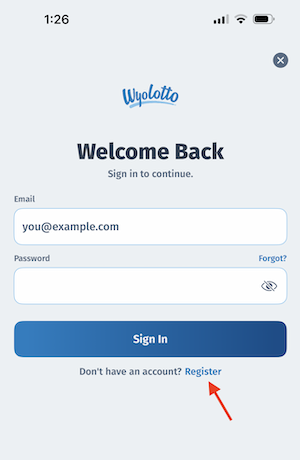
2. Tap the "Register" link below the blue Sign In button as seen below:
3. Input your desired email address
4. Input your desired password
5. Press the "Continue" button
6. Check your email and input the 6-digit code
7. Fill out the one-page registration form (be sure to use your legal name and personal information)
8. You must check the box to agree to the Terms & Conditions
9. Press the "Continue" button
If your registration is approved, that's it - you're in! If you make a mistake you may be able to go back and correct the form again. But if all else fails, as a final step, we will ask you to upload a few pictures so that we can verify you manually.
Was this article helpful?
That’s Great!
Thank you for your feedback
Sorry! We couldn't be helpful
Thank you for your feedback
Feedback sent
We appreciate your effort and will try to fix the article